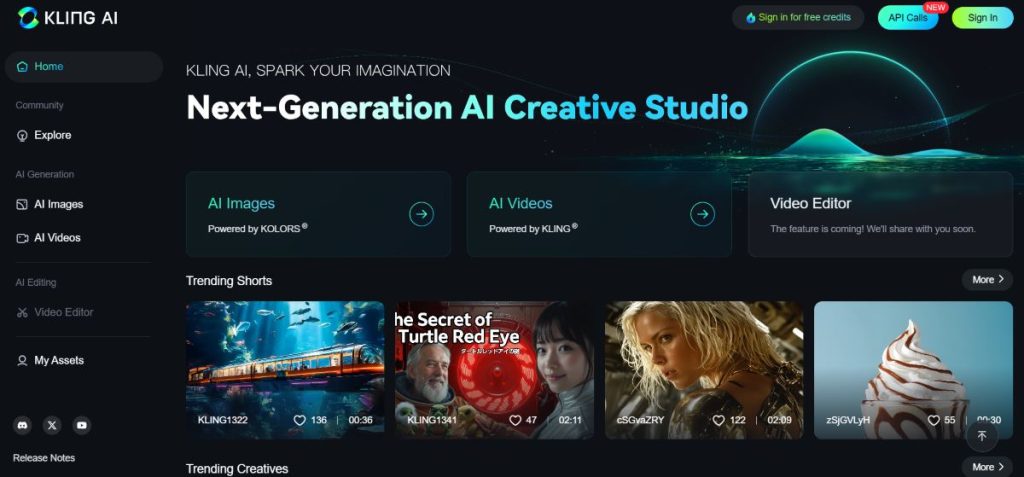
Kling AI Image Generator and Video Editor is a comprehensive tool designed to empower creators with AI-driven image generation and video editing capabilities. This tool combines intuitive design with advanced AI, making it an excellent choice for artists, designers, marketers, content creators, and even hobbyists. Here’s a breakdown of its uses, pricing structure, tools, and unique features.
Uses
Kling AI is versatile and ideal for a range of creative and professional applications, including:
- Content Creation for Social Media: Produce visually stunning content that stands out on social platforms. The AI generator is perfect for generating unique images, while the video editor helps streamline video creation with transitions, text overlays, and effects.
- Marketing and Advertising: Marketers can use Kling AI to quickly create visuals and ads, which helps in branding, audience engagement, and campaigns. From product mockups to promotional videos, Kling AI simplifies the creative process.
- Storytelling and Artistic Projects: Artists and storytellers can bring characters, scenes, or conceptual designs to life using Kling’s AI image generation, allowing for high levels of customization to suit specific themes.
- Business and Professional Presentations: Kling AI’s editing tools enable the creation of engaging presentations and explainer videos, ideal for corporate use, tutorials, and training materials.
- Prototyping for Design and Animation: Designers can use the image generator for rapid prototyping, concept creation, and storyboard visualization. The video editor offers a way to bring animated sequences to life, suitable for concept videos or demos.
Pricing
Free Plan: This tier provides daily free credits, allowing users to explore basic features and create limited content each day. It’s ideal for trying out Kling AI’s capabilities without commitment.
Standard Plan: Starting at $3.80/month with the annual subscription (or at the regular monthly rate of $10), this plan includes essential tools, higher export limits, and access to a broader range of templates and effects. The yearly plan offers a significant discount for users who commit long-term.
Pro Plan: Available at a discounted rate when paid annually, this plan gives users full access to Kling AI’s advanced editing features, high-resolution exports, and premium assets. It’s perfect for creators seeking more comprehensive capabilities for their projects.
Premier Plan: This customizable plan is offered at a reduced rate with an annual subscription, tailored for businesses needing extensive access, collaborative tools, and API integration.
Tools
Kling AI provides a diverse toolkit, including:
- AI Image Generator: Users can input prompts to generate highly customized images. The generator offers various styles and settings, allowing users to tweak elements like colors, mood, and composition for specific results.
- Video Editing Suite: The editor includes tools for trimming, cutting, merging, and adding effects to videos. Users can import their footage or use AI-generated assets for a seamless editing experience.
- Transition and Filter Library: A robust library with a range of transitions and filters helps users enhance the look and feel of their content. It includes classic effects like fades, wipes, and slides, as well as modern, AI-generated options.
- Text and Caption Tools: Kling AI’s text overlay tools allow users to add captions, titles, and text animations to their videos, which is especially helpful for tutorials, ads, or social media content.
- Audio Editing: The audio tool includes background music and sound effects that are automatically synchronized to the content, with options for volume adjustment and noise reduction.
- Templates and Presets: For quick projects, Kling AI offers a range of customizable templates for both images and videos. These templates are optimized for different purposes, such as YouTube thumbnails, Instagram posts, presentations, and ads.
- Export Options: Users can export in various formats and resolutions, including high-definition formats suitable for professional use. Export settings are flexible, with options for both standard and premium quality.
Features
Kling AI’s feature set is tailored to streamline and enhance the creative process:
- Smart Suggestions: Kling AI’s algorithm provides real-time suggestions for filters, effects, and transitions based on the content type, making it beginner-friendly and saving time for experienced users.
- Realistic Image Rendering: The AI image generator can create lifelike images with a range of styles, from photorealism to abstract art. Users can adjust parameters to refine the level of detail, lighting, and texture in their creations.
- Layering System: The video editor includes a robust layering system, allowing users to add multiple layers of video, images, and audio tracks. This feature enables more complex editing workflows and advanced customization.
- Green Screen/Chroma Key Support: Kling AI’s video editor offers chroma key functionality for removing backgrounds, ideal for overlaying subjects on different backgrounds or creating cinematic effects.
- Color Grading and Correction: Advanced color grading options allow users to fine-tune the aesthetic of their videos, from adjusting brightness and contrast to applying cinematic color tones.
- Intelligent Background Removal: With one-click background removal, users can isolate subjects for images or videos, which is useful for product photography, headshots, or character design.
- Seamless Integration: Kling AI supports integration with other creative tools via plugins and APIs, allowing professionals to incorporate Kling into their existing workflows smoothly.
- Collaborative Tools: The Enterprise Plan includes collaborative tools, such as shared folders, project versioning, and real-time co-editing, ideal for team projects and agencies.
- Export Customization: Kling AI offers a range of export options, from social media-ready formats to high-resolution exports suitable for print or cinema. Users can select from different file types (JPEG, PNG, MP4, etc.) and resolutions, based on the intended use.